Times from the job site. Month-end close in minutes.

Your team clocks in on their phones right at the customer’s site. You see who works where, approve times, and at the end of the month the timesheets and the DATEV file are ready – no more typing up paper slips.

  • Free during the test phase
  • For employees in 10 languages
  • Works without signal
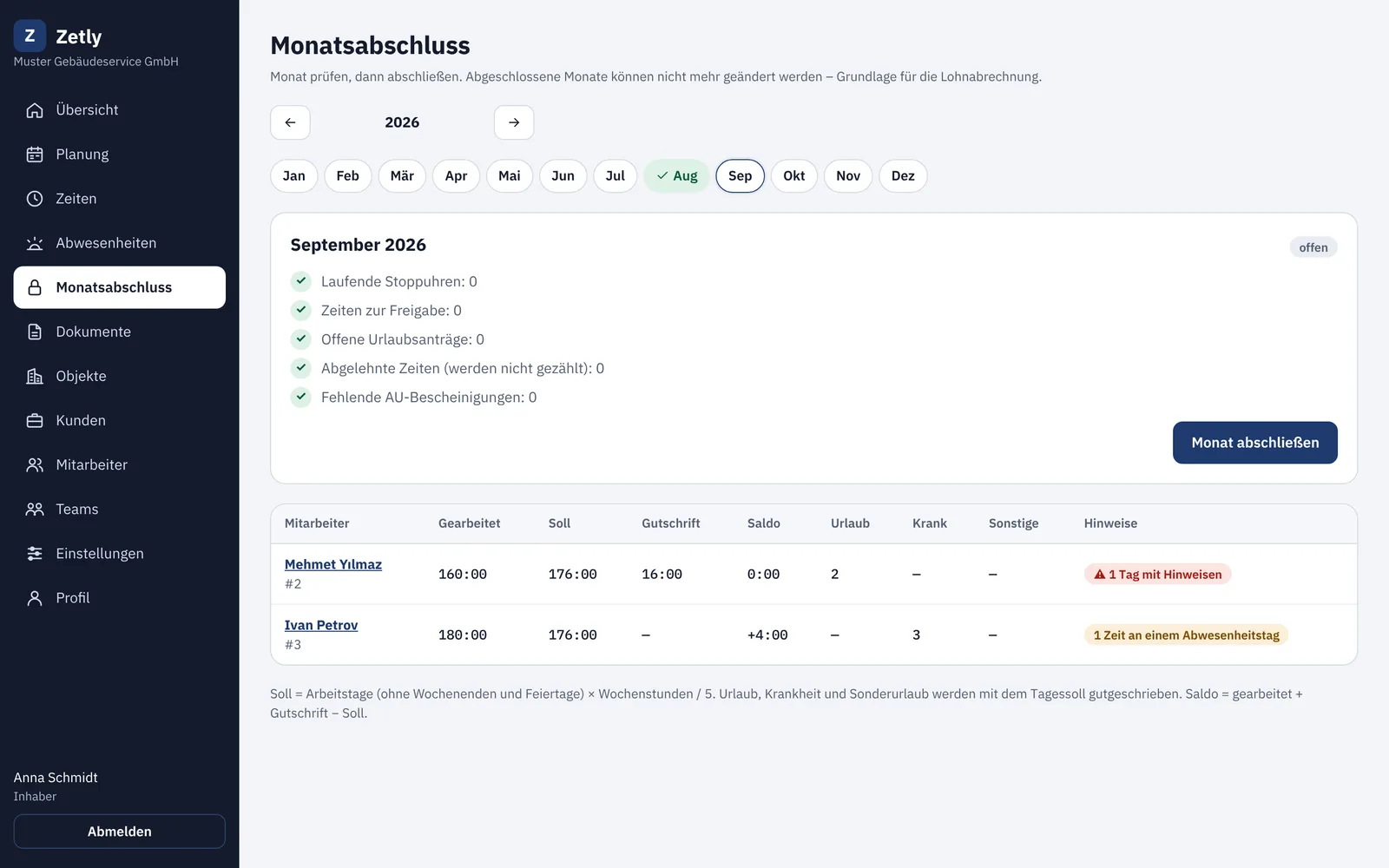
Zetly in the office: month-end close with checklist and hours per employee Zetly on a phone: running working time, today’s job with address and key note

A month with Zetly

September
  1. Tu 1
  2. We 2
  3. Th 3
  4. Fr 4
  5. Sa 5
  6. Su 6
  7. Mo 7
  8. Tu 8
  9. We 9
  10. Th 10
  11. Fr 11
  12. Sa 12
  13. Su 13
  14. Mo 14
  15. Tu 15
  16. We 16
  17. Th 17
  18. Fr 18
  19. Sa 19
  20. Su 20
  21. Mo 21
  22. Tu 22
  23. We 23
  24. Th 24
  25. Fr 25
  26. Sa 26
  27. Su 27
  28. Mo 28
  29. Tu 29
  30. We 30 Close
  1. 1

    Every morning

    Employees open Zetly, see their job with address, key note and checklist, and tap “Start”.

  2. 2

    Every week

    Team leads or the office check the times. Zetly flags missing breaks or overly long days under the German Working Hours Act.

  3. 3

    At month end

    Close the month, have timesheets signed, send the DATEV file to your tax advisor – all in one afternoon.

One team – everyone sees what they need

Office, team leads and employees work in the same app. Everyone only sees what they need for their job – nobody types up paper sheets, nobody chases hours by phone.

  1. 07:00 Office The office has planned the week’s assignments.
  2. 07:30 Employee Employees see their assignment and tap “Start”.
  3. 16:00 Team lead The team lead checks the times on site and approves them.
  4. Month end Office The office closes the month – timesheets and DATEV file are ready.

Office & owner

Mostly on the computer – on the phone when on the road

  • Plans assignments for all sites and teams
  • Sees times, absences and open approvals at a glance
  • Closes the month: timesheets, service reports, DATEV
  • Invites employees with a WhatsApp link
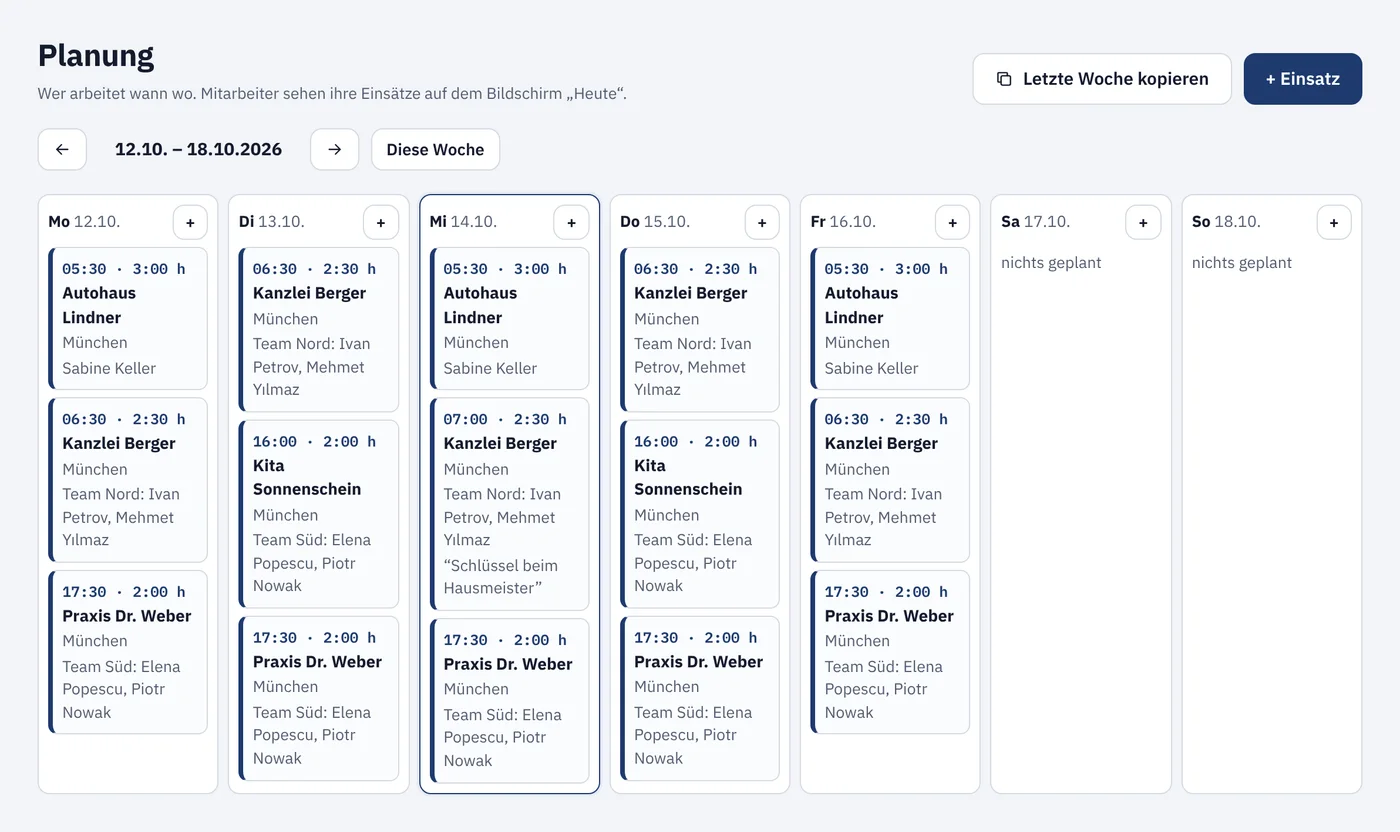
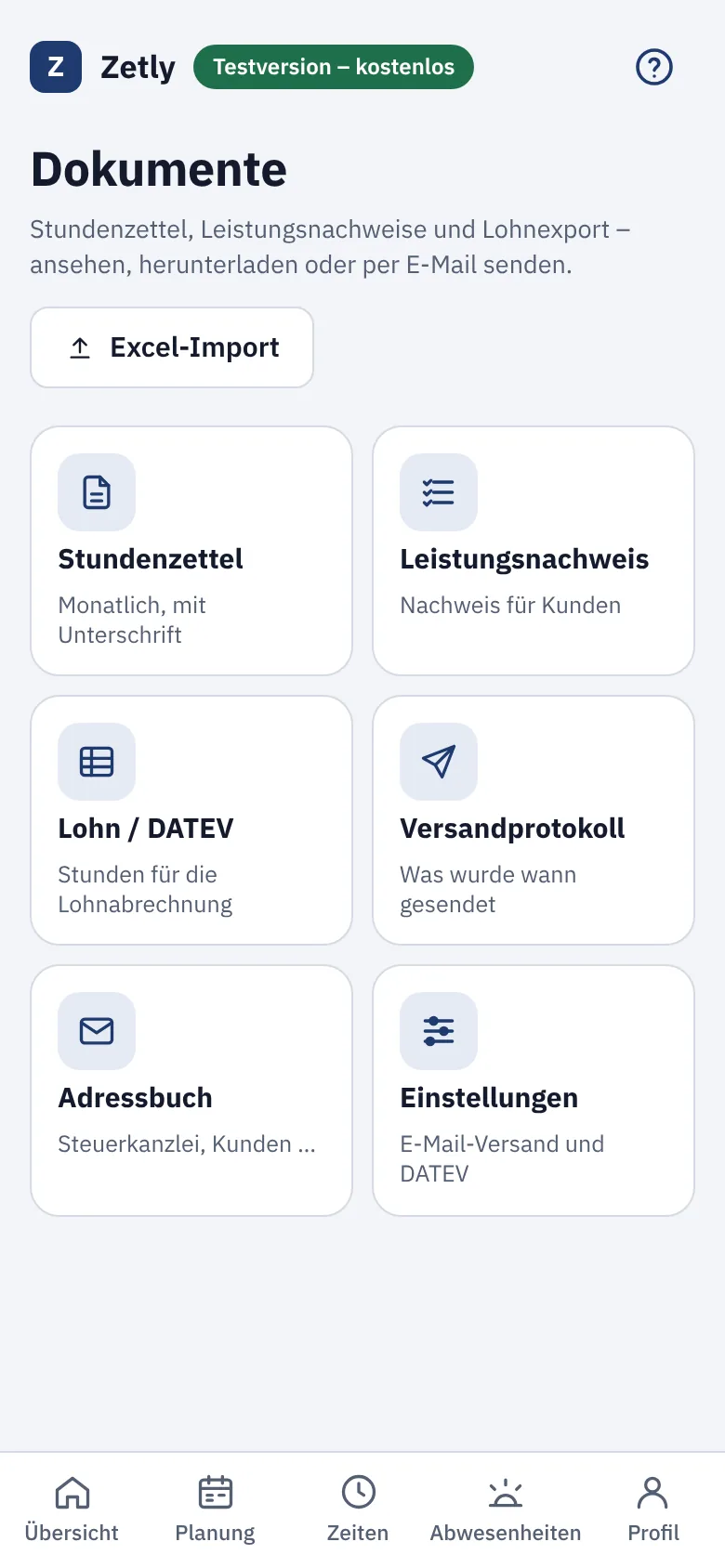
Office on the computer: weekly plan with assignmentsOffice on the phone: documents as tiles

Team lead

On the phone on site – on the computer in the office

  • Only sees their own team and sites
  • Approves times right from the phone – with hints on missing breaks or long days
  • Records times for the whole team at once
  • Plans their own team and approves vacation requests
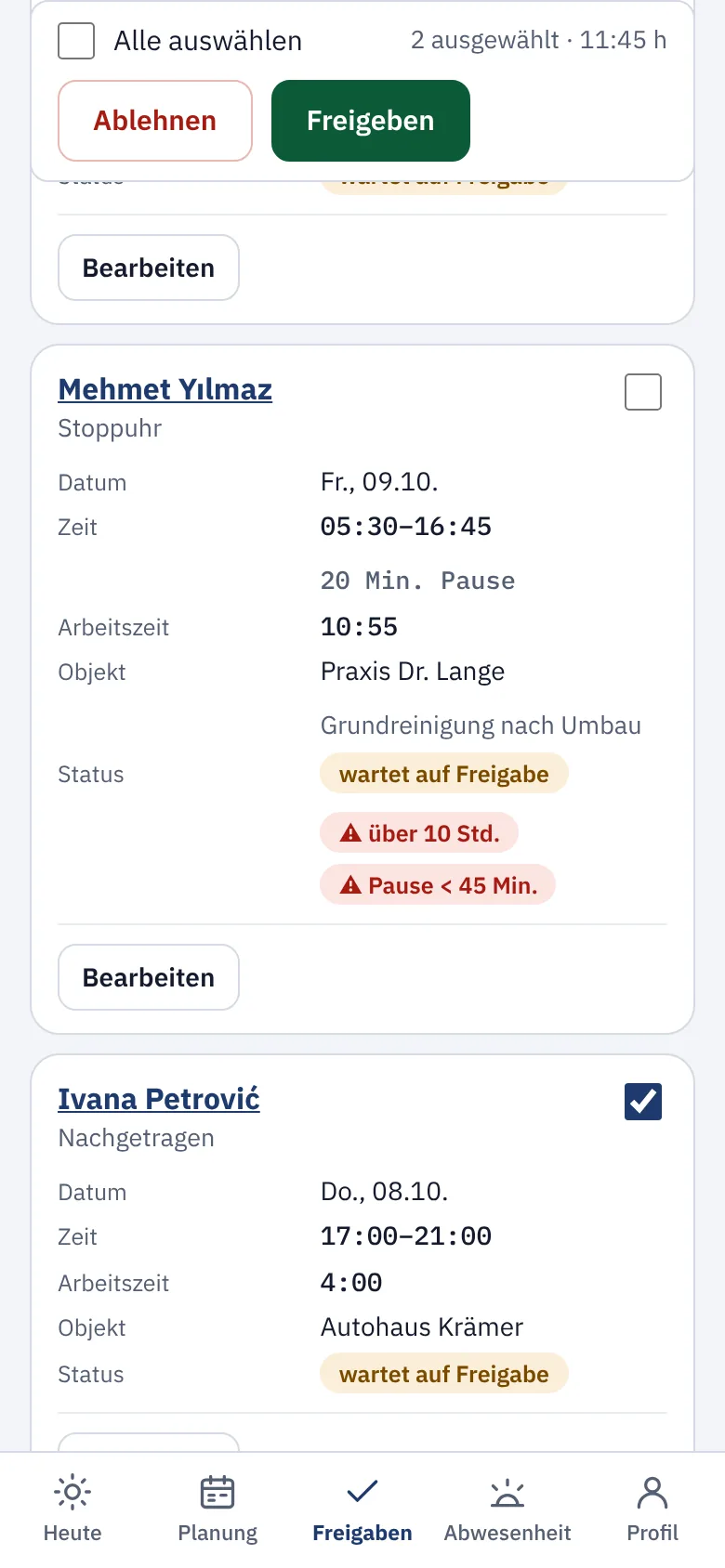
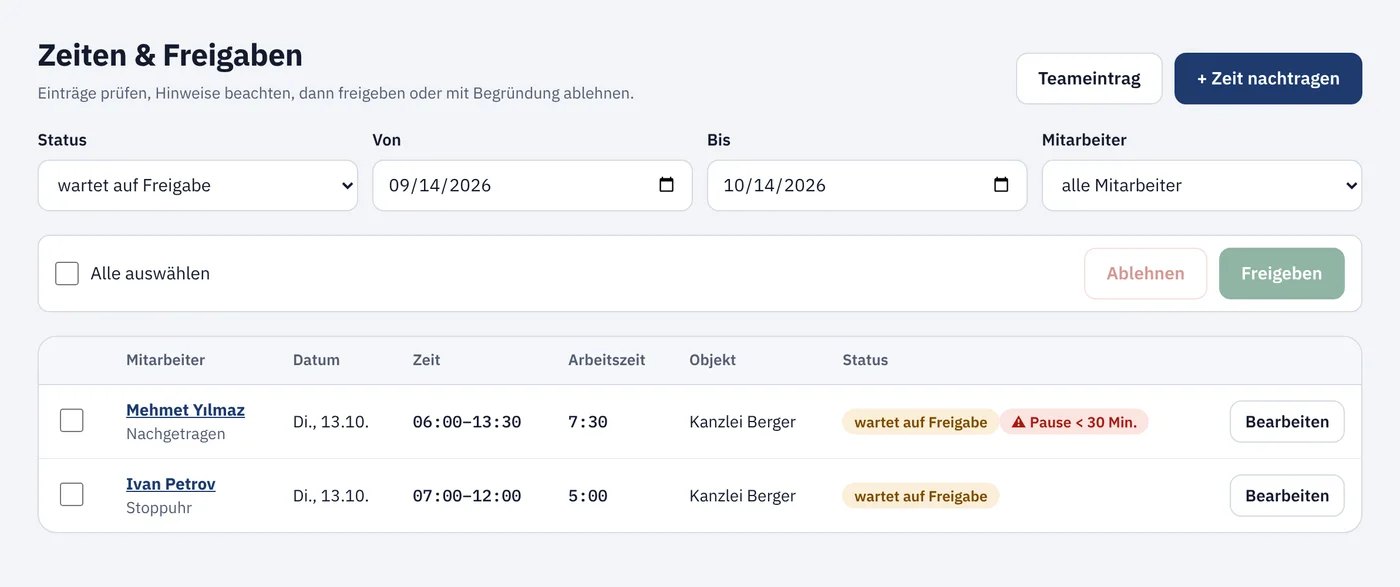
Team lead on the phone: approving times with working-time hintsTeam lead on the computer: list of times to approve

Employees

Just the phone – no computer, no app store

  • One screen: today’s assignment, address, key note, checklist
  • Start, break, finish – even without signal
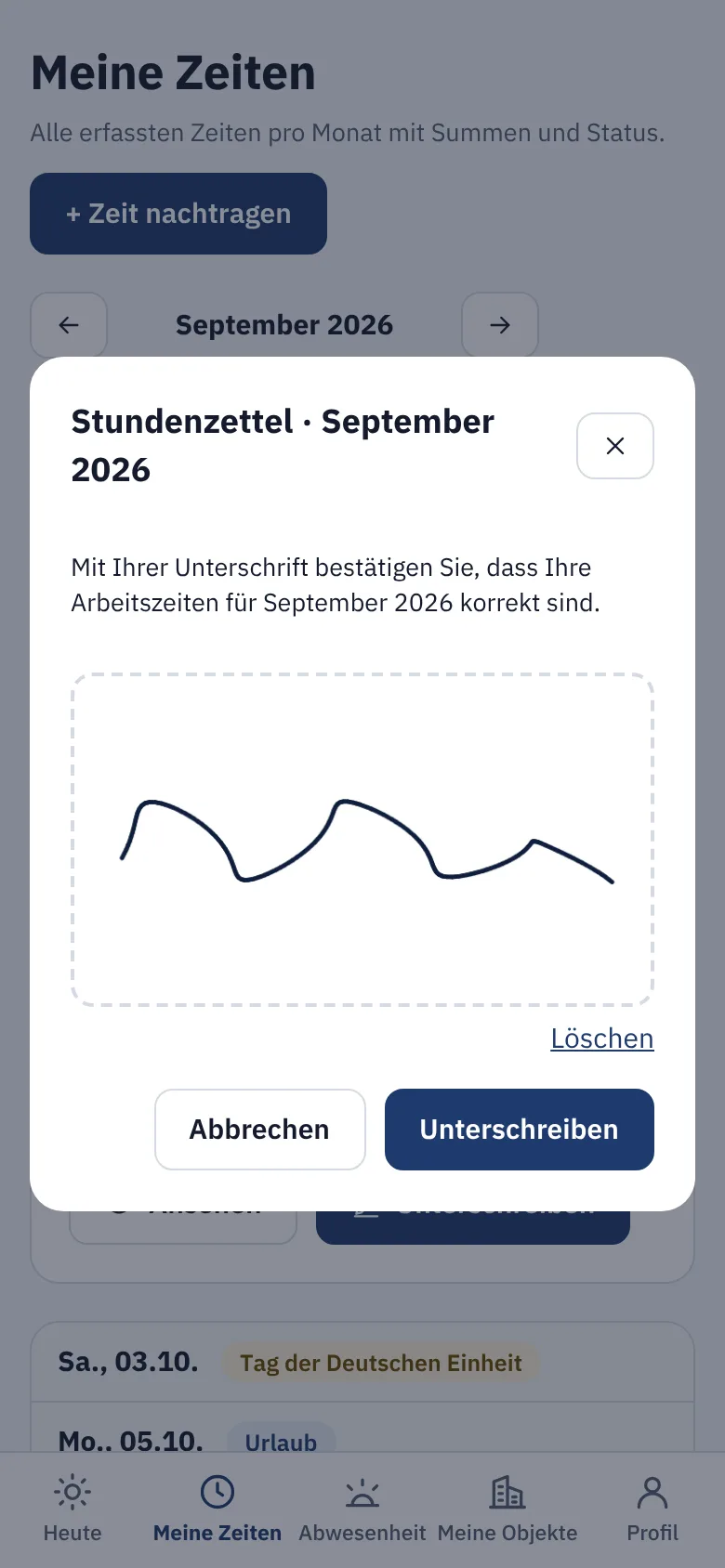
  • In their own language, sign the timesheet on the phone
  • Only see their own times and data
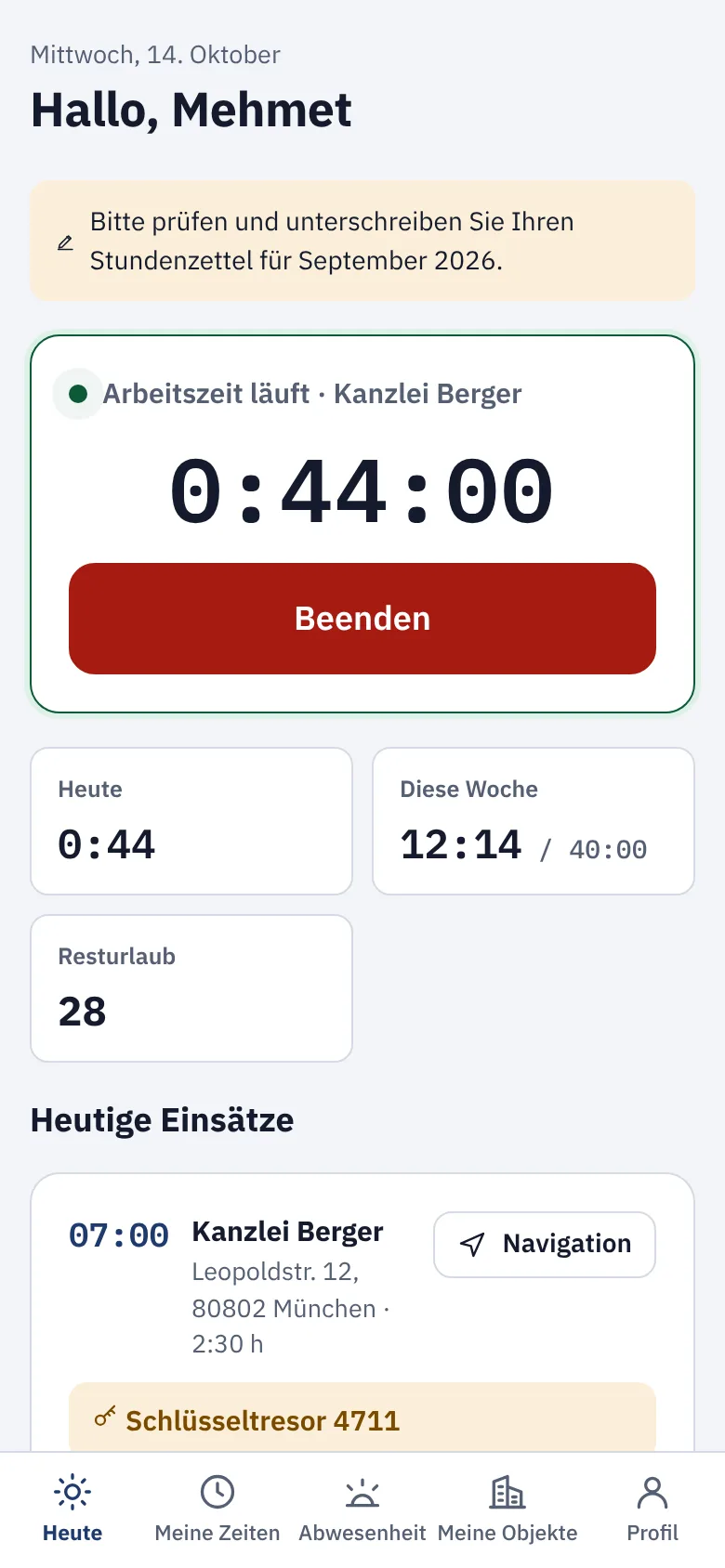
Employee on the phone: today’s assignment with running stopwatchEmployee on the phone: signing the timesheet

Roles and permissions are built in: employees only see their own times, team leads only their team.

No more paper chaos

Before

  • Photos of timesheets via WhatsApp
  • Typing hours into Excel at month end
  • Asking who was at which customer and when
  • Vacation and sick notes by word of mouth
  • Payroll data prepared by hand for the tax advisor

With Zetly

  • Times come straight from the phone – with site and break
  • Monthly total, target and balance are already calculated
  • The weekly schedule shows everyone their job
  • Requests, sick notes and vacation balance in one place
  • DATEV file and Excel in one click

Everything between the job and payroll

Start, break, stop – no training needed

On the “Today” screen every employee sees their job: address with navigation, key notes and the day’s tasks. Without signal the time is saved and sent later.

  • Stopwatch or entry afterwards
  • Checklist per site
  • One entry for the whole crew
“Today” screen with running stopwatch

The weekly schedule for all sites

Create jobs, assign teams, copy last week in one click. Each employee only sees their own jobs – on their phone, in the morning.

  • Teams and individual employees
  • Sites with customer, address and tasks
  • Copy a week
Weekly schedule with jobs from Monday to Friday

Check times before they count

Team leads and the office approve times or reject them with a reason. Zetly points out violations of the Working Hours Act: missing break, more than ten hours, too little rest.

  • Approve one by one or in bulk
  • Working Hours Act warnings
  • Reason when rejecting
List of times awaiting approval with break warning

Vacation, sickness and public holidays at a glance

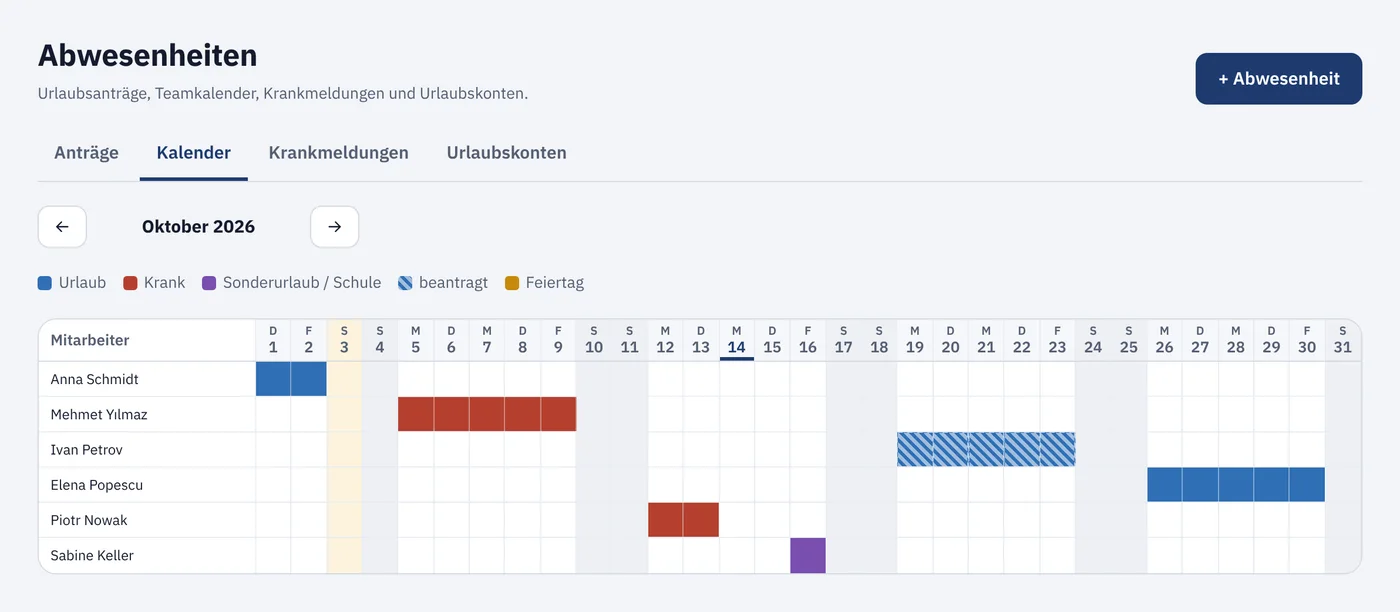
Vacation requests by phone, sick notes with a reminder about the medical certificate, vacation balance with pro-rata entitlement. Public holidays for your federal state are already included.

  • Team calendar for the whole month
  • Vacation balance per employee
  • Holidays of all 16 German states
Team calendar with vacation and sickness

Timesheets signed on the phone

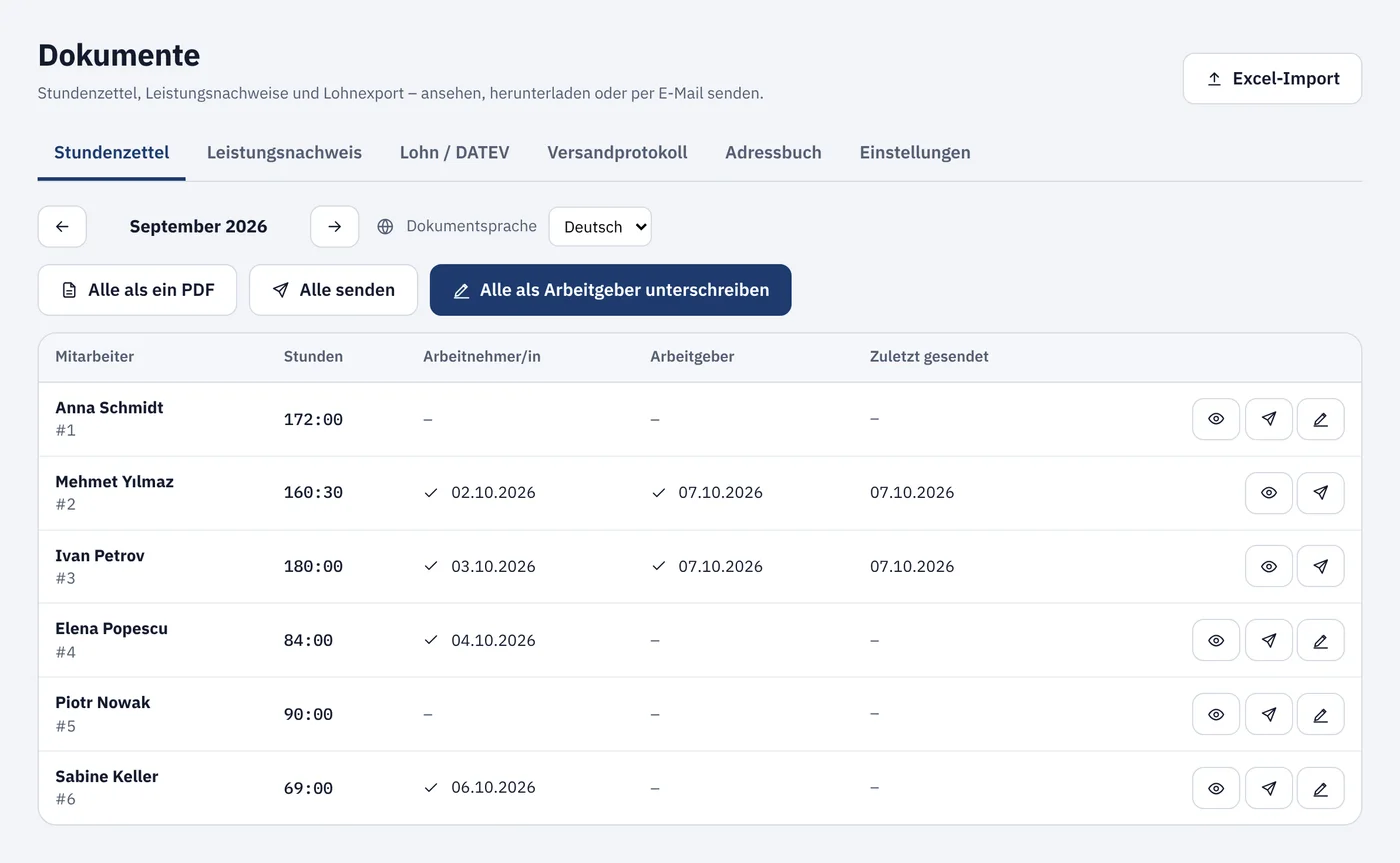
After the month is closed, every employee signs their timesheet with a finger. You sign all of them at once and send the PDFs by e-mail. For your customers there is a proof of service per site.

  • PDF timesheet per § 17 MiLoG
  • Signed by employee and employer
  • Proof of service for customers
Overview of timesheets with signaturesSigning on the phone

Payroll data for DATEV and Excel

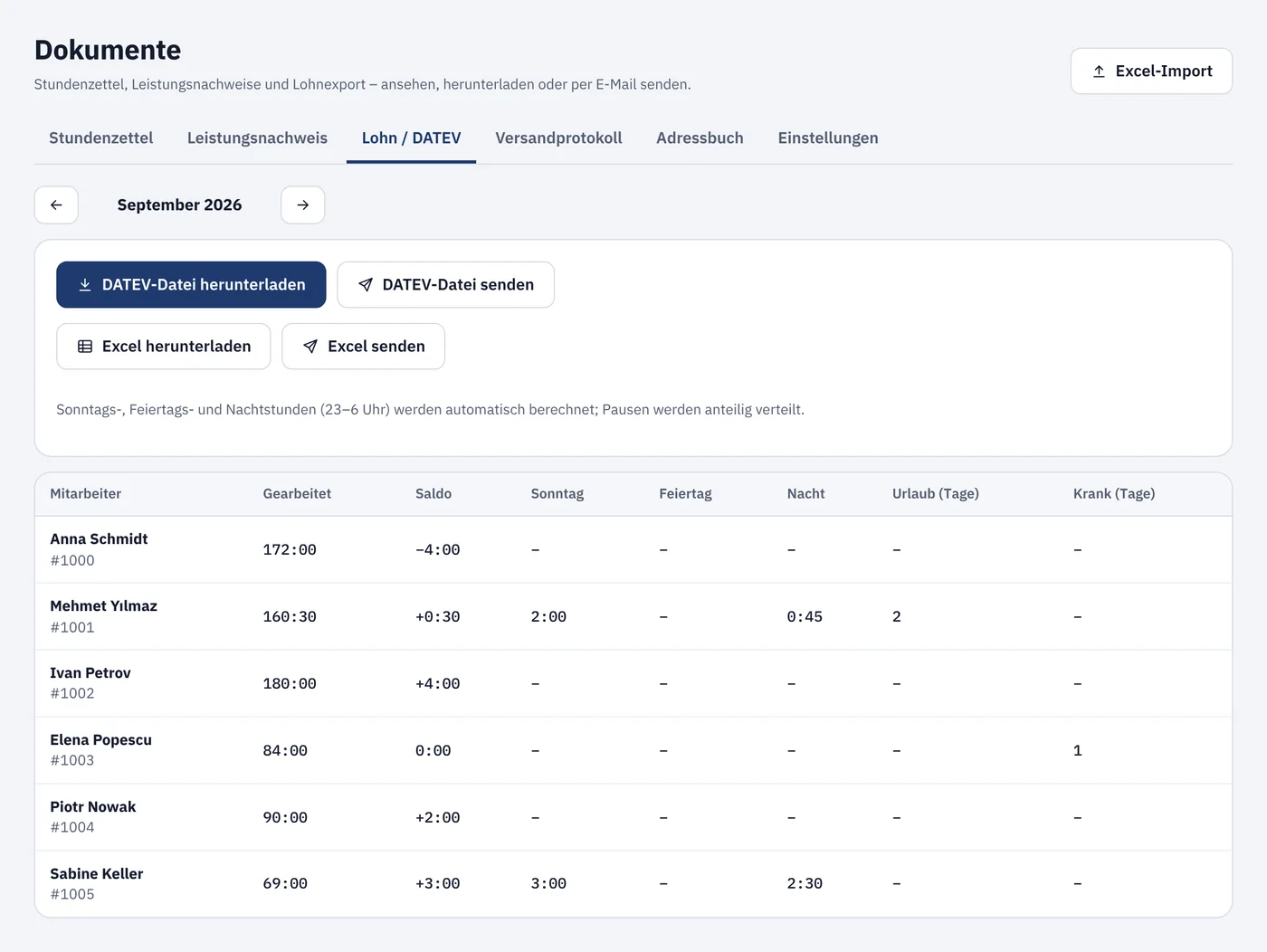
Working hours, Sunday, holiday and night hours, vacation and sick days per employee – as a DATEV import file (LODAS) or Excel. You set up the wage types once with your tax advisor.

  • Surcharge hours calculated automatically
  • Closed months only
  • Send straight to your tax advisor
Payroll overview with DATEV export

Everyone on the team understands the app

Employees choose their own language, right from the WhatsApp invitation. The office keeps working in German – timesheets and payroll data stay German.

All employee screens in 10 languages.

  • Deutsch
  • Türkçe
  • Polski
  • Română
  • Български
  • Bosanski
  • Shqip
  • Українська
  • Русский
  • English

Free test phase

Zetly is new and is being developed together with the first companies. During the test phase you use every feature free of charge.

Test phase

€0

for all features and any number of employees

  • Time tracking, planning, absences
  • Signed timesheets, service reports, e-mail sending
  • DATEV and Excel export, Excel import
  • No credit card, no payment details
Try for free

What happens next

  1. NowEverything is free. Send your wishes and questions directly in the app via “Help & feedback”.
  2. Before the test phase endsWe will inform you about prices and conditions by e-mail at least four weeks in advance.
  3. You decideThere is no automatic switch. You actively book a plan – or export your data and we delete the account.

Frequently asked questions

Do my employees need an app from the app store?

No. Zetly runs in the phone’s browser. Employees get a link via WhatsApp or e-mail, choose their language and a password – done.

What happens without internet at the customer’s site?

The time keeps running and is saved on the phone. As soon as there is signal again, Zetly sends the entries automatically.

Does Zetly work with our payroll?

Zetly creates an import file for DATEV LODAS or a simple CSV file that DATEV Lohn und Gehalt and other programs can read. You set up the wage types once with your tax advisor.

Can we bring our existing lists?

Yes. Employees, customers and sites can be imported from an Excel file. Zetly shows you beforehand what will be created.

Where is the data stored?

On servers in Germany. Transfer is encrypted, passwords are only stored as a secure hash.

What does Zetly cost?

Nothing during the test phase – all features are free and we do not ask for payment details. Before Zetly becomes a paid service, we will inform you by e-mail at least four weeks in advance. There is no automatic switch: costs only arise if you book a plan yourself.

What does “test phase” mean?

Zetly is fully usable and is continuously improved. Report questions, wishes and problems directly in the app under “Help & feedback” – you will get the answer by e-mail and in the app.

Try Zetly with your team

Create your company, invite employees, record the first times – set up in ten minutes. Free during the test phase.